# 2026
# February 3rd, 2026
This release includes the following bug fixes:
#### Call Attendance Report Percentage
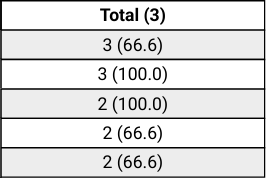
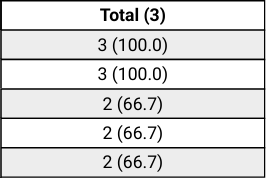
The *Call Attendance Report* in *Fire Station Online* has been updated to show the correct percentage in the table. This had previously been broken when we updated this report to sort by the total calls attended.
Before the fix, the report would generate percentages that look like this:
[](https://docs.firestationsoftware.com/uploads/images/gallery/2026-02/image.png)
Now, with the fix made, the percentages are correctly placed:
[](https://docs.firestationsoftware.com/uploads/images/gallery/2026-02/PNbimage.png)
# February 16th, 2026
This release addresses a database stability issue in *Fire Station Desktop* that could cause certain screens to stop responding to the database, display an error message, or fail to load data.
The following modules and screens were affected:
#### Pre-Planning
- Manage Locations
- Edit PrePlans
- Manage Custom Questions
- Location Call History
- Reports
- Construction Types
- Extinguishment Types
- Floor Types
- Location Types
- Occupancy Types
- Roof Types
- Status Types
- Wall Types
#### Incident Reporting
- Enter New NFIRS Call
- Enter New Quick Call
- Enter New Non-Emerg Event
- Edit Entered Calls
- Edit Non-Emerg Events
- Reports
- Edit Call Types
- Edit Roles
- Edit Invoice Line Items
#### Apparatus Checks
- View Completed Checks
Additional improvements were made to shared components used across the application to further improve database stability.
# March 5th, 2026
This release includes new reports and several bug fixes for *Fire Station Online* Incident Reporting.
#### Incident Type Report
A new *Incident Type Report* is now available in Fire Station Online. This report allows you to view a breakdown of incidents by their type over a selected date range, making it easier to analyze call trends and identify patterns in incident activity.
#### Calls at a Location Report
A new *Calls at a Location Report* has been added to Fire Station Online. This report allows you to search for a location and view all calls that have occurred at that location. The report supports searching by address, and includes filtering options to narrow results by date range and call type.
#### Call Saving Reliability Improvements
Significant improvements have been made to the reliability of saving NERIS calls in Fire Station Online. The real-time connection between Fire Station and the server has been reworked to better handle acknowledgments, reconnections, and concurrent edits. These changes address issues where calls could fail to save or edits could be lost under certain conditions.
#### Location Picker Fix
An issue has been fixed where the location picker on NERIS calls could display an error when selecting a location. This was caused by an issue with address parsing that has been corrected.
#### Call Loading Failure Fix
A bug has been fixed where certain calls could fail to load due to sparse array corruption in the call merging process. This could occur when editing calls that had been previously saved with certain data patterns, resulting in an error when trying to open the call.
# March 11th, 2026
This release includes new reports, new features, and several bug fixes across Fire Station Online.
#### EMS Data from Quick Calls in NERIS
The EMS tab from Quick Calls is now available for use in NERIS calls.
#### Calls At Location Report
The *Calls At Location* report is now available in Fire Station Online. This report allows you to view all calls that occurred at a specific location, with support for geo-filtering using coordinates on NERIS calls.
#### Incident Type Report
The *Incident Type* report is now available, allowing you to generate reports broken down by incident type.
#### Active911 Settings Page Errors
Fixed two issues on the Active911 Settings page. The first was a *"No Save Context Available"* error that appeared when opening the settings page. The second was the Alerts tab getting stuck on *"Pending"* when reloading alerts. The Alerts tab fix also resolves a broader issue where progress and completion updates for background tasks were not being delivered to the browser.
#### Units & Location Not Syncing on Converted Calls
Fixed a bug where setting a location on the Basic tab or entering units on the Units tab of a converted Quick Call or NFIRS call was not syncing those changes to the Dispatch tab.
#### Payroll Report Error
Fixed an error that caused the Payroll PDF report to fail for certain departments with a database error. The report now generates correctly for all departments.
#### Location Search Coordinate Detection
Fixed a bug where street addresses containing multiple numbers (e.g., "108 6th Ave") were incorrectly detected as GPS coordinates in the location search. The coordinate detection now requires decimal points with sufficient precision, preventing false matches on normal street addresses.
# June 17th, 2026
#### Personnel Module
With the user permissions, you can now fully manage Personnel through the online web interface.
#### Training Module
With the user permissions, the Training module online offers flexibility for tracking and documenting training activities.
Now categorize training by location. Example: Online, Classroom, On-Site or Off-site
Record Water/Foam usage for individual training events
#### Report Integration for Gallons Used and Payroll
Training data is now integrated into the Payroll Report and Water/Foam Usage Report of the Incident Reporting module, giving one central location and a single report to include both incident and training details.
# June 18th, 2026
This update includes enhancements to the newly released Training and Personnel modules online, along with updates to the Incident Reporting module. This release only applies to *Fire Station Online*.
#### Max Length on NERIS and Quick Calls
While editing calls, certain fields had a maximum allowed length that when exceeded caused an error while saving. This appeared as though the call was saving indefinitely and never finished saving. This has been corrected and the fields have been updated to enforce the length limits. Notes have been added to certain fields to indicate their maximum length (when especially short). Such fields include the *License Plate Number* and *Mobile VIN* on the *Vehicles* tab of NERIS and Quick Calls.
Affected Modules: Incident Reporting
#### Station Grouping on Call and Training Lists
The list of calls on the *Edit Entered Calls* page and the list of training events on the *Edit Entered Events* page have been updated to group calls/events by station. Previously the calls/events were only grouped by year.
Affected Modules: Incident Reporting and Training
#### Sorting by Name in Reports
Reports that support sorting by name have been updated to sort by last name then by first name. This only applies if the report is sorted by name and not by Department ID. Reports that have been updated include:
- In the Training module: Certifications Matrix Report, Certifications Report, Training Year Summary Report, Driver/Operator Hours Report, Check In Sheet Report, OSHA Hours Report, ISO Training Report, Training Payroll Report
- In the Incident Reporting module: Payroll Report, Man Hours Report, Call Attendance Report, Print Non-Emergency Event
- In the Personnel module: Mailing List Report, Length of Service Report, Personnel Report
Affected Modules: Incident Reporting, Training and Personnel
# July 16th, 2026
#### Inventory modules available online
All inventory modules are now available in *Fire Station Online*. **If your department's license includes them**, you should now see *Hoses*, *Hydrants*, *Inventory*, *Ladders*, *PPE*, *Ropes*, and *SCBAs*. These modules are all fully backwards compatible with the *Fire Station Desktop* app and if you previously entered inventory from the desktop app it is also available online.
#### Changes to the *Inventory* module
The *Inventory* module has been brought online with support for all the functionality available in the *Fire Station Desktop* app but with the following changes. This module is fully backwards compatible but has been re-structured to make it easier to use.
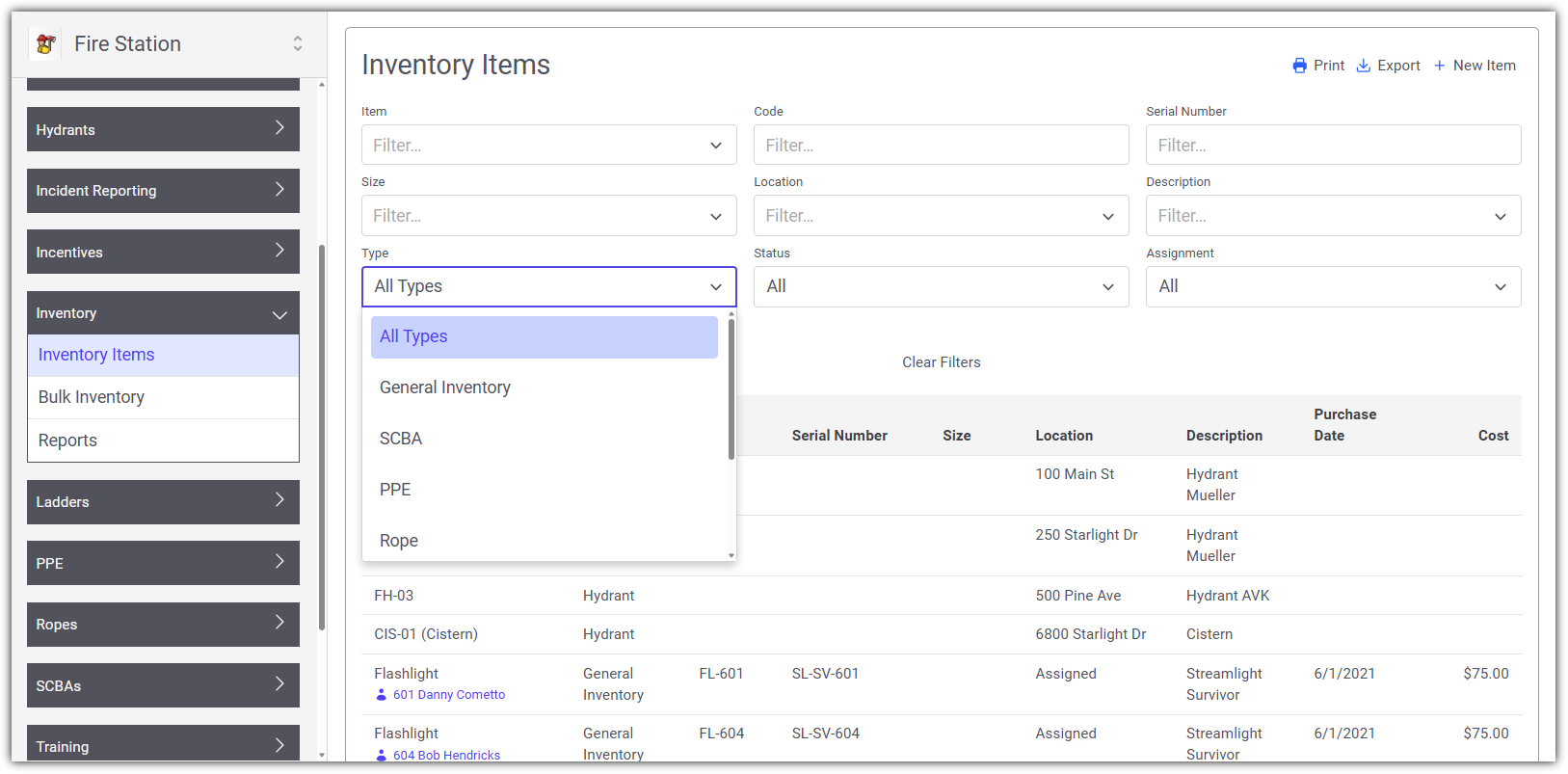
The *Inventory Items* page now shows a consolidated list of all your department's inventory items across all the inventory related modules. This includes personal inventory, hoses, hoses, hydrants, ladders, PPE, ropes, and SCBAs in addition to general inventory items. You can filter the list of inventory items by type as well.
[](https://docs.firestationsoftware.com/uploads/images/gallery/2026-07/image.png)
There is now a distinction between individual inventory "items" and bulk or "stocked" inventory. Any item that is tracked individually, meaning each item is entered as a unique record in Fire Station, appears under the *Inventory Items* page. These are items that have unique identifiers such as serial numbers.
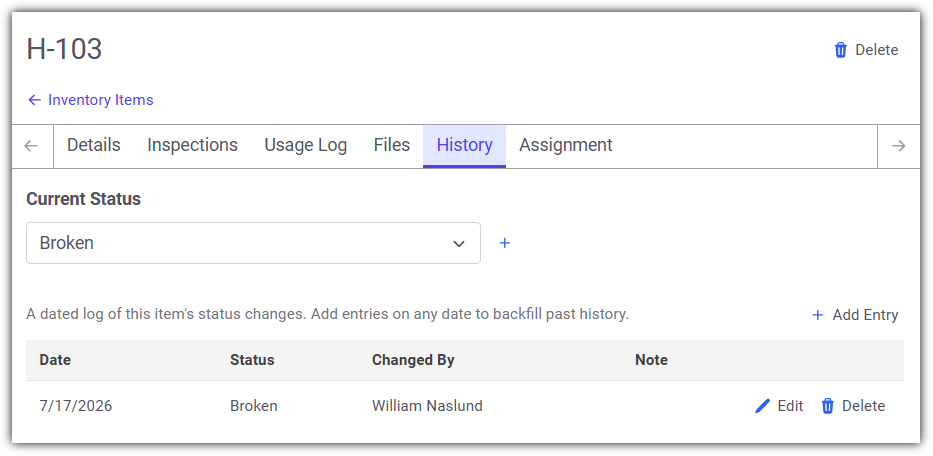
The status of inventory items can also be tracked in Fire Station, giving you a place to record the current state of each item. This can be especially helpful if items get lost, stolen, or broken and you need a way to indicate that the item is unavailable for use while still retaining a record of it in Fire Station.
[](https://docs.firestationsoftware.com/uploads/images/gallery/2026-07/ggwimage.png)
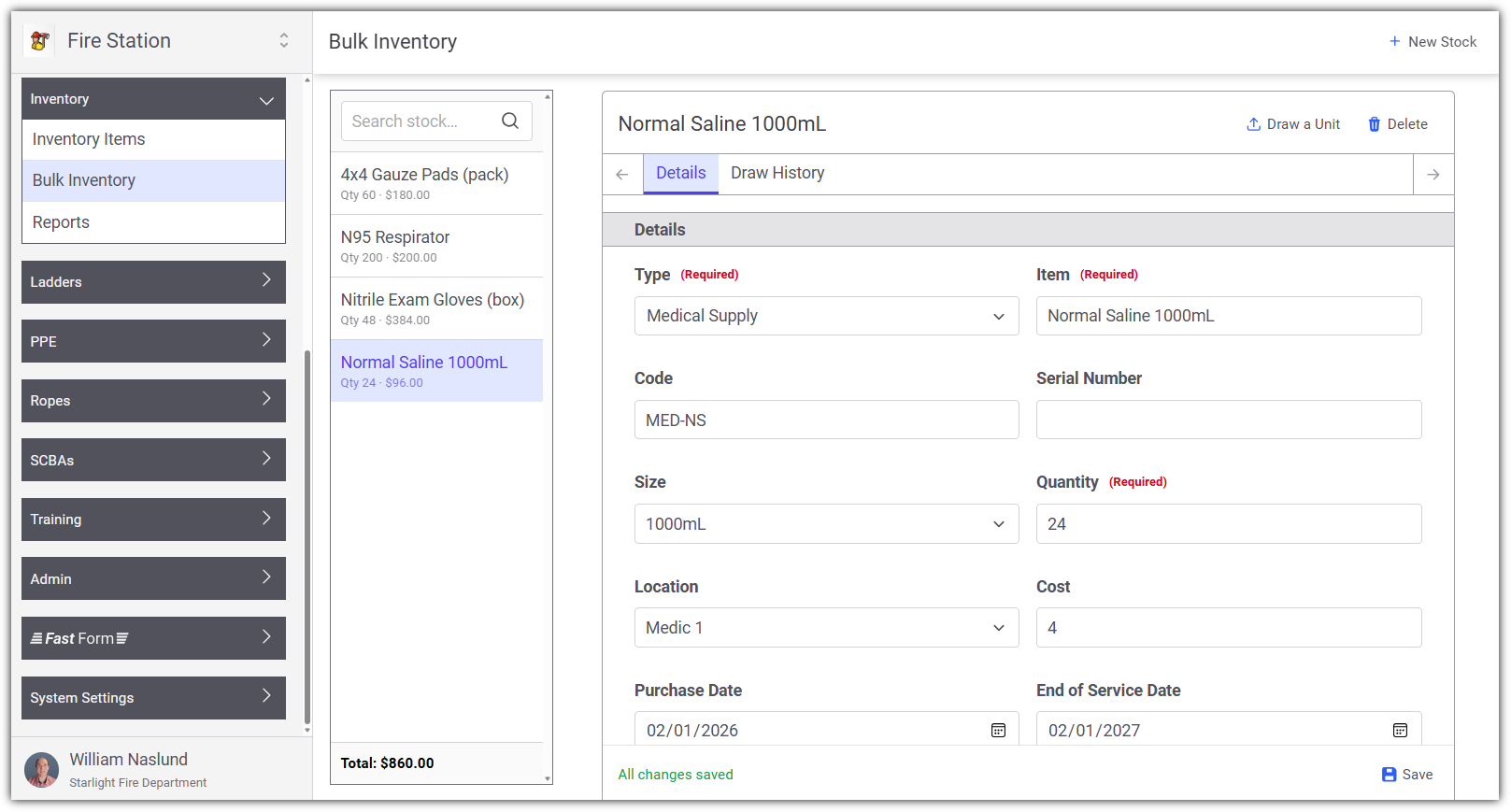
Inventory that is not tracked individually, where a single record has a quantity of items, appears under the *Bulk Inventory* page. These records are called "stock" records since they represent one or more of the same item. You can draw from stock records, creating an inventory item and decreasing the quantity stocked by 1. This takes the place of the "Move to ..." buttons that were previously available in the *Fire Station Desktop* app.
[](https://docs.firestationsoftware.com/uploads/images/gallery/2026-07/Pkjimage.png)